🚀 Portable does more than just ELT. Explore Our AI Orchestration Capabilities
NetSuite to Snowflake Integration in Minutes
Replicate NetSuite data into Snowflake with our no-code ELT tool. All custom record types and all custom fields supported.
No code. Fixed pricing. Outstanding support. Get started in minutes.


- Connection Mode
- SuiteAnalytics Connect ODBC Driver
- Data Source
- NetSuite2.com
- NetSuite Record Types
- 1,000+
- Record Types Supported
- All Standard and Custom Types
- Custom Fields
- All Custom Fields
- Incremental Syncing
- Yes - Automatically Detected
- Setup Time
- ~1 Hour (You need a NetSuite Admin)
- Data Volumes
- Unlimited
- Pricing
- Flat-rate monthly (Advanced Plan)
- Commitment
- Month-to-month
Trusted by data-driven teams running production data pipelines




Set Up Your Pipeline in 5 Minutes
No code. No infrastructure. No API documentation required.
- 1
Create a Portable account
With our risk-free 14 day free trial, you can start moving data fast.
- 2
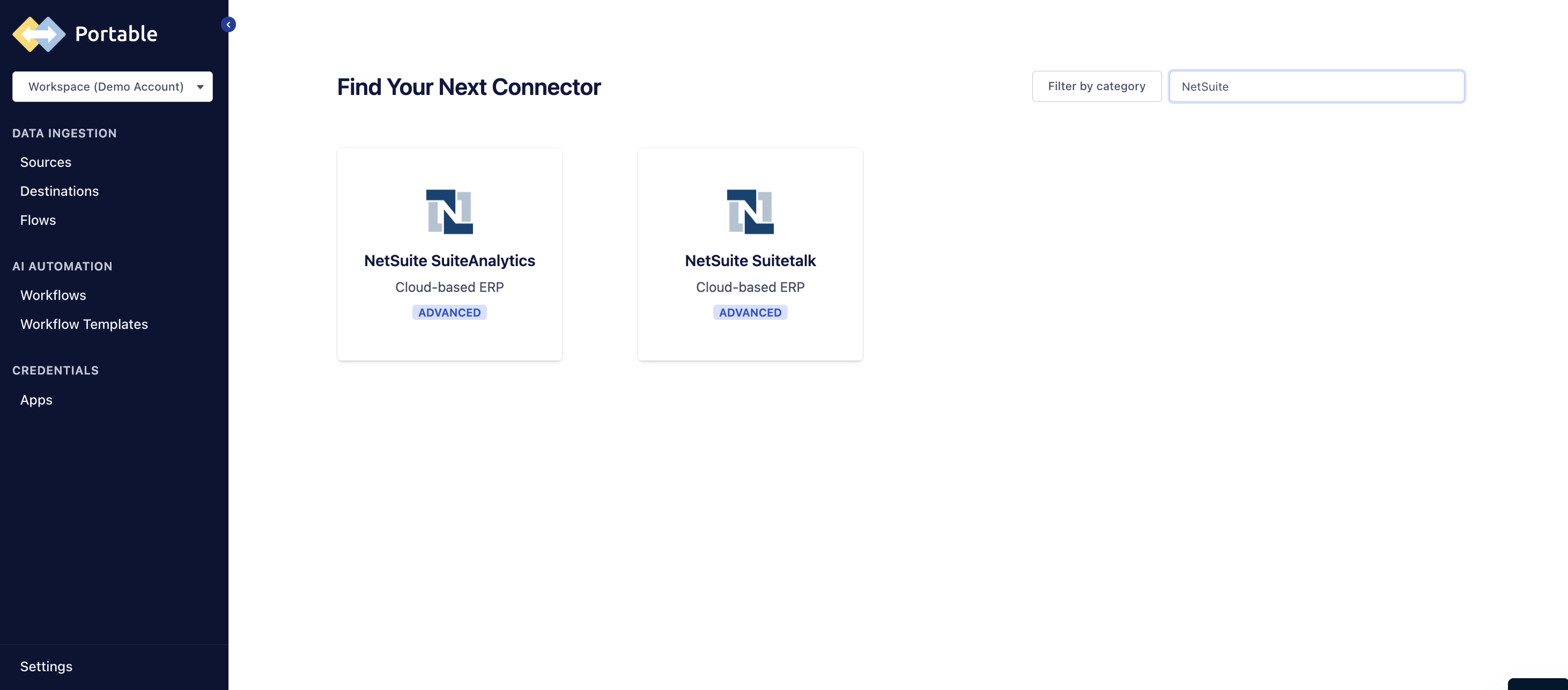
Add NetSuite SuiteAnalytics as a source
Search the connector catalog and select NetSuite SuiteAnalytics. Enter your NetSuite Account ID and token-based authentication credentials.
- 3
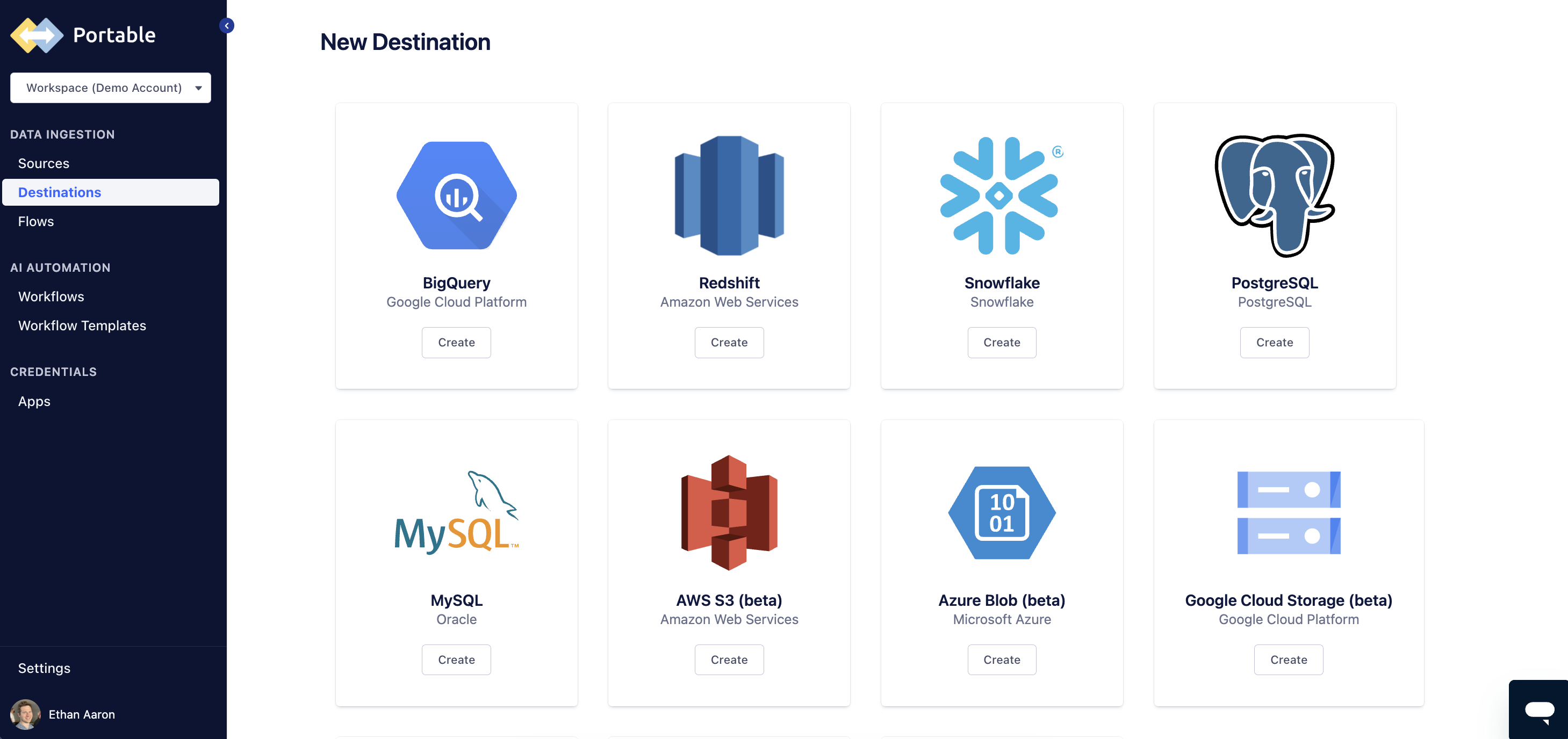
Configure your Snowflake destination
Select Snowflake from the Destinations dashboard. Enter your Snowflake account URL, warehouse, database, and schema. Portable creates tables automatically.
- 4
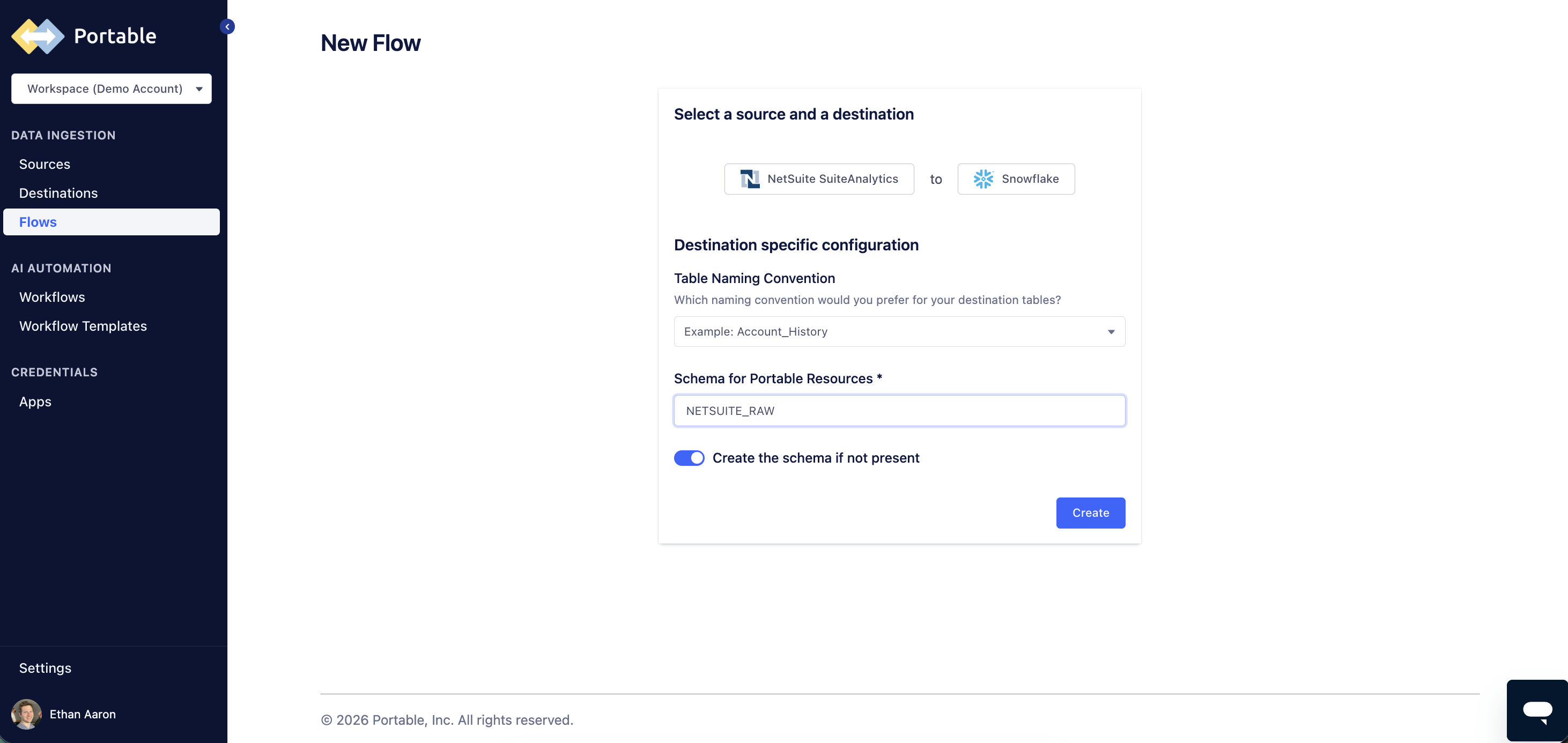
Create a Flow
A flow in Portable connects your NetSuite source to your Snowflake destination. Specify your target table naming convention and target schema name (e.g., NETSUITE_RAW).
- 5
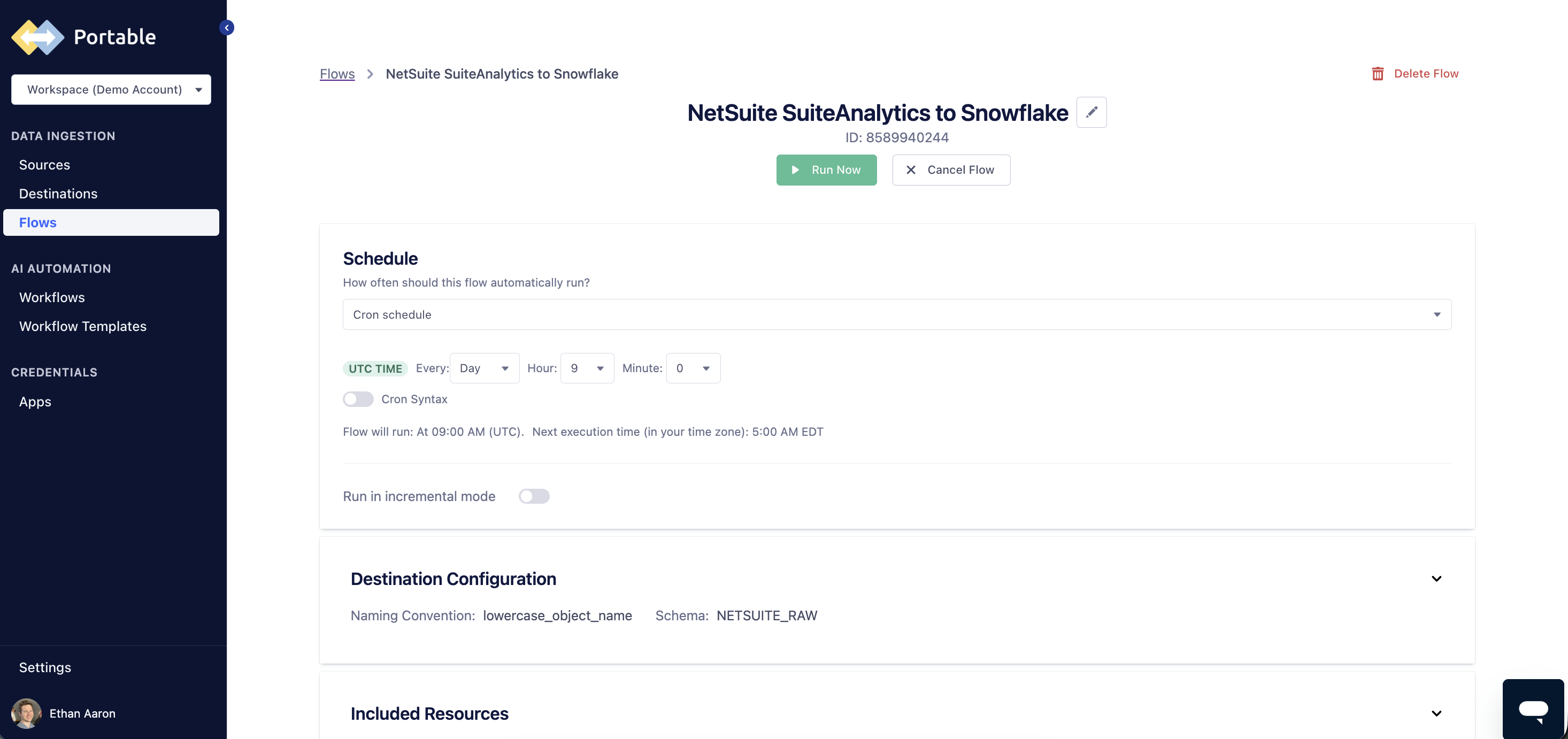
Run your first sync and schedule recurring syncs
Trigger your initial full load manually, or set up automated orchestration. Customize your frequency using an easy UI scheduler or custom Cron syntax, and toggle 'Run in incremental mode' to pull modified records efficiently.
- 6
Query NetSuite data in Snowflake
Connect Looker, Omni, Sigma, Hex, Tableau, Power BI or your visualization tool of choice directly to Snowflake to use standard SQL to analyze your NetSuite data.
Trusted By The Best Data Teams in the World
Don't take our word for it. Hear from our customers about how Portable has transformed their data workflows and enabled them to unlock the full potential of centralized analytics.
This company is amazing! I have been working for months to pull Shopify GraphQL API data for various endpoints in my free time and kept hitting roadblocks. I was recommended to Portable by another Analytics Engineer and I am so happy he did.

The team is the most responsive team I have ever worked with. Within 2 hours they will create a new integration for us. Can't stress how great their team is.

Portable offered a Shippo Integration for us when our other vendor stopped supporting their broken integration. We got up and running quickly and still continue to have a smooth Integration.

Support team is top notch. Ability to connect just about any data sources and if they dont have it, they can build it quickly. Cost effective. Set it and forget it. Super easy to set up.

The Portable team is amazingly helpful when I reach out with questions. Their response time and overall thoughtfulness when providing support is some of the best I've ever experienced. Most questions I've sent them are answered almost immediately, and solutions are either provided or started on within hours.

I'm really glad that Mozart Data and Portable partner together for a seamless managed data stack. It allows us to connect Chargebee to our data warehouse and empowers us to analyze our subscriptions in new ways that we could not before.

This company is amazing! I have been working for months to pull Shopify GraphQL API data for various endpoints in my free time and kept hitting roadblocks. I was recommended to Portable by another Analytics Engineer and I am so happy he did.
The team is the most responsive team I have ever worked with. Within 2 hours they will create a new integration for us. Can't stress how great their team is.
Portable offered a Shippo Integration for us when our other vendor stopped supporting their broken integration. We got up and running quickly and still continue to have a smooth Integration.
Support team is top notch. Ability to connect just about any data sources and if they dont have it, they can build it quickly. Cost effective. Set it and forget it. Super easy to set up.
The Portable team is amazingly helpful when I reach out with questions. Their response time and overall thoughtfulness when providing support is some of the best I've ever experienced. Most questions I've sent them are answered almost immediately, and solutions are either provided or started on within hours.
I'm really glad that Mozart Data and Portable partner together for a seamless managed data stack. It allows us to connect Chargebee to our data warehouse and empowers us to analyze our subscriptions in new ways that we could not before.
This company is amazing! I have been working for months to pull Shopify GraphQL API data for various endpoints in my free time and kept hitting roadblocks. I was recommended to Portable by another Analytics Engineer and I am so happy he did.
The team is the most responsive team I have ever worked with. Within 2 hours they will create a new integration for us. Can't stress how great their team is.
Portable offered a Shippo Integration for us when our other vendor stopped supporting their broken integration. We got up and running quickly and still continue to have a smooth Integration.
Support team is top notch. Ability to connect just about any data sources and if they dont have it, they can build it quickly. Cost effective. Set it and forget it. Super easy to set up.
The Portable team is amazingly helpful when I reach out with questions. Their response time and overall thoughtfulness when providing support is some of the best I've ever experienced. Most questions I've sent them are answered almost immediately, and solutions are either provided or started on within hours.
I'm really glad that Mozart Data and Portable partner together for a seamless managed data stack. It allows us to connect Chargebee to our data warehouse and empowers us to analyze our subscriptions in new ways that we could not before.
This company is amazing! I have been working for months to pull Shopify GraphQL API data for various endpoints in my free time and kept hitting roadblocks. I was recommended to Portable by another Analytics Engineer and I am so happy he did.
The team is the most responsive team I have ever worked with. Within 2 hours they will create a new integration for us. Can't stress how great their team is.
Portable offered a Shippo Integration for us when our other vendor stopped supporting their broken integration. We got up and running quickly and still continue to have a smooth Integration.
Support team is top notch. Ability to connect just about any data sources and if they dont have it, they can build it quickly. Cost effective. Set it and forget it. Super easy to set up.
The Portable team is amazingly helpful when I reach out with questions. Their response time and overall thoughtfulness when providing support is some of the best I've ever experienced. Most questions I've sent them are answered almost immediately, and solutions are either provided or started on within hours.
I'm really glad that Mozart Data and Portable partner together for a seamless managed data stack. It allows us to connect Chargebee to our data warehouse and empowers us to analyze our subscriptions in new ways that we could not before.
With Portable, What Data Can You Replicate from NetSuite to Snowflake?
Portable seamlessly replicates all NetSuite SuiteAnalytics standard and custom record types into Snowflake as clean, flat tables. All custom fields included.
Get your standard and custom record types and load data into ready-to-query schemas automatically.
Transactions
Invoices, bills, purchase orders, sales orders, credit memos, and journal entries.
Customers & Contacts
Customer master records, billing addresses, contacts, and account hierarchies.
Items & Inventory
Inventory items, assemblies, lot numbers, bin locations, and stock levels.
GL Accounts & Periods
Chart of accounts, accounting periods, budgets, and balance sheet data.
Employees & Payroll
Employee records, departments, roles, payroll summaries, and expense reports.
Vendors & Purchasing
Vendor master data, purchase history, payment terms, and 1099 tracking.
Projects & Time
Project records, task assignments, time entries, and project profitability.
Custom Records & Fields
Custom entity fields, custom record types, and saved search definitions.
Example Dashboards You Can Build With Your NetSuite Data in Snowflake
Teams use NetSuite data in Snowflake to automate business processes - powering use cases across finance, operations, and workforce planning modules, improving decision-making and automated workflows.
Financial Reporting & Forecasting
Combine NetSuite GL, budgets, and actuals in Snowflake to build P&L, balance sheet, and cash flow dashboards in Tableau, Looker, or Power BI. Run rolling forecasts with access to full transaction history - all backed by the scalability of Snowflake’s architecture.
Build It Yourself vs. Use Portable
Building a production-grade NetSuite ETL pipeline from scratch takes months or years without a dedicated integration platform — and breaks whenever NetSuite updates their API or their ODBC driver.
Build it yourself
- ✗Read and navigate NetSuite JDBC/ODBC drivers or SOAP/REST API documentation
- ✗Set up and manage token-based authentication credentials
- ✗Handle API rate limits, database concurrency and pagination of result sets
- ✗Parse complex nested transaction line items into flat tables
- ✗Write custom schema definitions for every record type
- ✗Build incremental sync logic using lastModified, lastModifiedDate or lineLastModifiedDate filters
- ✗Handle NetSuite API version changes, driver upgrades, or breaking updates introduced in your NetSuite environment
- ✗Monitor pipeline health and debug failures in production
Use Portable
- Connect in minutes with a guided no-code setup wizard
- Automated schema detection for all NetSuite record types (standard and custom)
- Automatic incremental sync with change detection for near real-time data analytics
- Flat, analytics-ready tables loaded directly into Snowflake
- Managed infrastructure — no servers or cron jobs to run
- Hands-on support from our connector team
- Predictable, flat-rate monthly pricing — no per-row fees or usage overages
- 14 day free trial — get started risk-free
All of your data at your fingertips.
Free to try. Unlimited data volumes. Hands-on support.